
.avif)
Productivity Hacks for Writers: Tools, Apps, and More
.avif)




It’s easy to be tempted by the latest hack to boost our writing productivity and create a professional writing process. But there’s a lot of advice out there, and let’s be honest: this kind of research is exactly the type of activity writers might use as a form of procrastination. And we want to avoid procrastination.
So, what are the best ways of hacking the writing life? Should we be utilizing the latest apps and technology, or reverting to something more analog to get the words down without distractions?
The Finished Novel Course
The complete writing journey. Follow a clear, proven path from first idea to a finished, publishing-ready novel.
Good news! We’ve gathered together the ultimate list of recommendations for you in the form of apps, hacks, websites, tips, and tools. These ideas come straight from the desks of The Novelry team of bestselling authors and publishing editors, helping you to improve your own writing process and productivity and get that story written.
You’ll probably already know some of these ideas—maybe you’re using a few already—but others will be new to you, and we encourage you to experiment and see what works. Plus, if you’re trying to get off your phone and get back to basics, don’t worry. We have a safe space at the end of this blog for those who prefer to be fully offline.
{{blog-banner-6="/blog-banners"}}
Can you write more words with music?
Audio accompaniment is common among writers, whether you prefer to hear absolute silence, background sports commentary, or emotional movie scores during your writing sessions. This was probably our most popular hack, used by both authors and editors alike.
We had a big chat about writing to movie soundtracks in the children’s fiction group on The Novelry Live with lots of great recommendations.
—Krystle Appiah
Sleep by Max Richter
Renowned composer Max Richter’s award-winning composition, Sleep, which is eight hours long, helps you sleep, meditate, and focus. Its ambitious live performance was the subject of a documentary, and you can watch the trailer below. Available as both an online stream and a free downloadable app on multiple platforms, writing coach Evie Wyld utilizes Sleep when she needs to get in the zone.
Brain.fm
This science-focused music app is used by writing coaches Kate Riordan and Alice Kuipers to optimize their writing time. Launched in 2014, Brain.fm isn’t just any music app—it helps listeners work better by blending into the background to produce distraction-free focus. How? By using gentle rhythmic pulses in the music that stimulate the brain and support sustained attention.
Endel
Award-winning authors Evie Wyld and Piers Torday both find Endel helpful and use it when they’re writing. Backed by neuroscience, Endel creates personalized soundscapes to help you focus, relax, and sleep. Your soundscape will be unique each time, because Endel will work out what you need based on factors like the time of day—and even the surrounding weather and your heart rate.
Thanks to our friends at Endel, you can use this special offer to try Endel completely free for one whole month—a great way to start a new year of writing. Simply head to this unique link, and get ready to sink into focus...
Spotify
One of the largest music streaming services in the world, many members of our team use Spotify playlists. A free account enables you to listen and make your own playlists, but some functions are limited and you’ll have to listen to ads.
Bea Fitzgerald, Katalina Watt, and Gina Sorell are just some of The Novelry’s writing coaches who create Spotify playlists for each project, which they listen to while writing. (Gina speaks about this in more detail in this episode of our podcast, The Novelry on Writing.) Melanie Conklin also listens to playlists, calling it a “Pavlovian response” that helps her get into writing mode.
It’s not just our writing coaches who turn up the volume on a playlist. Editor Elizabeth Kulhanek likes to listen to a Spotify album called Calming Music for Anxious Cats while she works, and fellow editor Josie Humber says:
I’ve found lots of “Pomodoro timer” playlists on Spotify, where it will play you 25 minutes of focus music, followed by 5 minutes of break-time fun music.
—Josie Humber
Not sure what a Pomodoro timer is? Don’t worry, we’ve got you. Let’s move on to time trackers!
The clock as your accountability partner
.avif)
The Pomodoro technique
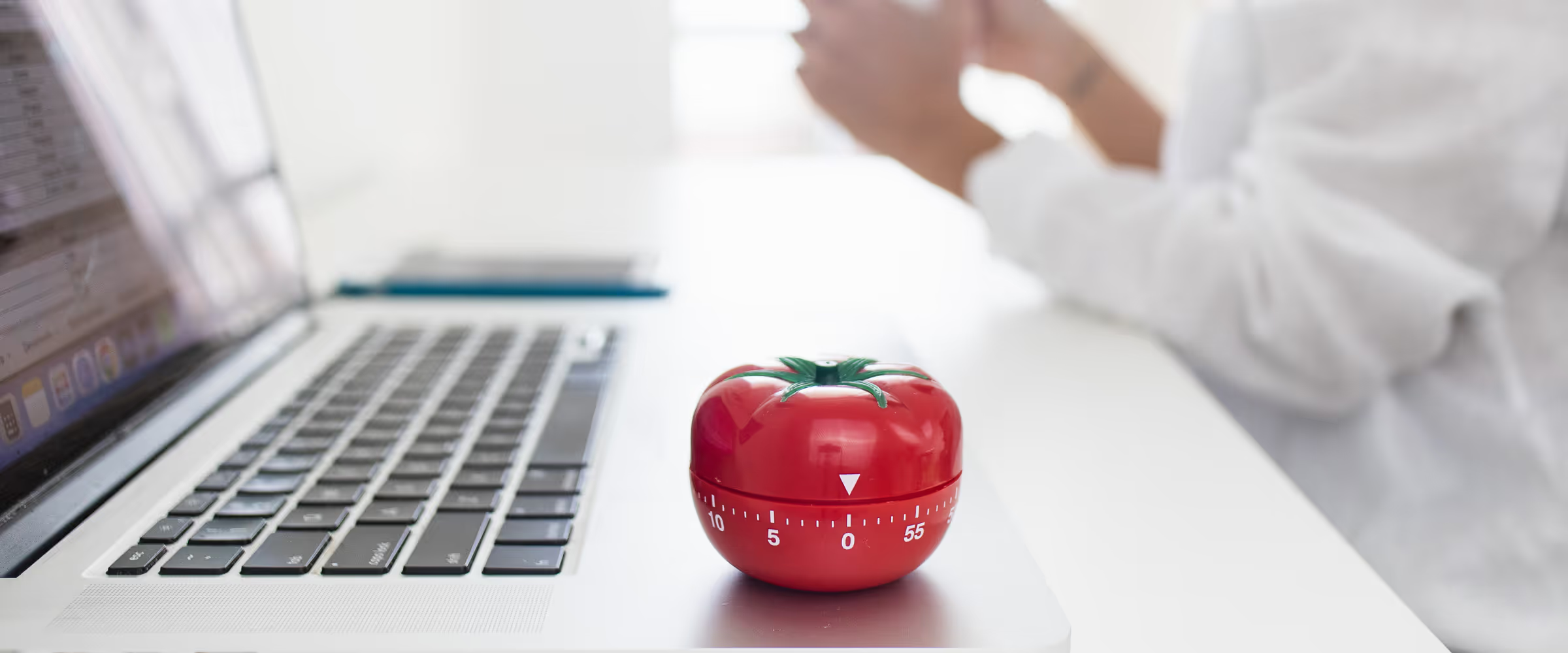
The Pomodoro technique is a time management technique that breaks a short period of time into two simple sections: 25 minutes of focused productivity, followed by 5 minutes of rest and downtime. It was developed in the 1980s by Francesco Cirillo, a writer and software designer who used a kitchen timer in the shape of a tomato to focus on his study when he was at university.
The 25:5 time-split is the traditional method, but some Pomodoro fans adjust this to suit their needs, perhaps with a 30:10 or a 45:15. It’s an incredibly simple way of getting a writing sprint done—especially as you don’t even need an app. You really can do it with a simple kitchen timer.
With its very simple structure of short bursts of active time followed by frequent rest periods, the Pomodoro method can be particularly beneficial for neurodivergent authors or people who get limited pockets of writing time. Writing coach Alice Kuipers uses this particular timer to get her books written.
Task Tracker
Writing coach Melanie Conklin uses Task Tracker to make timers for her individual projects, allowing her to keep her writing sessions organized.
I can track how long I spend on each of them. You just tap the circle to start writing and tap again to stop, so it’s easy.
—Melanie Conklin
Keeping an eye on your word count goal
Pacemaker
Pacemaker Planner is a playful way of making and meeting your writing goals. You set a word count goal, chip away at it day by day, and finish on time!
Many of our writers at The Novelry made use of Pacemaker to keep track of their writing output during The Big Write: our challenge to get a first draft written by the end of 2025. And it definitely helped, because collectively, our challengers wrote 2.2 million words in three months! Come on in and join us—members of The Novelry are eligible for a 25% discount on Pacemaker Planner for life.
Dabble
Dabble, a writing software program, also has a word count feature (among many others). You can set a target number of words for your project and the date you’d like to finish it by, and it will calculate how many words you need to write daily to get there. What’s more, if you skip a day and fall behind, or write more than you were expecting, the counter recalibrates itself accordingly. Think of it as your novel’s start-to-finish GPS.
Dabble has a whole plethora of helpful features to help you focus on your novel and organize your story, and members of The Novelry receive a special 20% discount. You can find out more in Bea Fitzgerald’s round-up article of the best writing software.
Visual inspiration for writing productivity
One for those of us who love to fill our writing space with inspiration pictures and moodboards, Pinterest is the online way of cutting out pictures from magazines and sticking them up on the wall. Among The Novelry’s biggest Pinterest fans are writing coaches Bea Fitzgerald and Gina Sorell.
I am a big fan of Pinterest for vision boards, but my biggest time-suck is Canva for vision boards, character aesthetics, quote graphics, etc.
—Bea Fitzgerald
Canva
As Bea mentions, Canva enables you to shuffle your images into prearranged templates and designs. As a result, Canva can serve not just as pure inspiration, but as a very handy way of creating a storyboard for your novel outline (something Melanie Conklin explores further in her blog about creating a visual outline for your book).
.avif)
Miro
Another option for a virtual whiteboard to record your notes, ideas, plans, and inspiration is Miro. Used by Alice Kuipers and Gina Sorell, and also recommended by author Maureen Johnson in one of our live writing workshops, Miro allows you to plan and create as intricately as you want if you’re happy to pay for extra features.
I especially enjoy Miro for collaborative writing projects.
—Gina Sorell
Apps to help you stay offline
Forest
A cute way to gamify time spent offline, Forest is an app where you plant a seed when you need to stay focused. As you stay off your phone, this seed will gradually grow into a tree—but if you can’t resist the temptation of using your phone, your tree will wither...
A favorite of both Bea Fitzgerald and Andrea Stewart, Forest gives you a virtual flourishing forest where each tree represents your good habits in time management—if you focus. You can even spend your virtual coins to help Forest (in partnership with Trees for the Future) plant real trees. So far, Forest users have planted more than 2 million trees by focusing on their creative projects.
.avif)
Freedom
Recommended by writing coach Ella McLeod among others, Freedom sets blocks across all your devices, enabling you to work while completely in control of any distractions. You can plan your Freedom time in advance to suit your writing schedule, with sessions recurring daily or weekly. Freedom users report gaining an average of 2.5 hours of productive time each day, and Andrea Stewart is one of them.
Back in the pandemic when we had to take my daughter to the doctor and I had to wait in the underground parking garage and wrote nearly 2,000 words in an hour, I had the terrible realization that I was much more productive without the internet.
—Andrea Stewart
Gina Sorell also likes Freedom for focus, but says:
I also love distractions, so I use it when I’m on a deadline!
—Gina Sorell
Want to give it a try? In conjunction with the lovely folks at Freedom, we are pleased to give you this special offer! Using the coupon code THENOVELRY, you’ll get a 30% discount on the Freedom app (new customers only, coupon valid until February 1, 2026).
.avif)
Flora
Similar in some ways to Forest, the Flora app also encourages focus by growing seeds into trees. It enables you to make To Do lists for specific tasks with set amounts of time—and it also allows you to challenge your friends. If you have an accountability deal with a writing partner and both of you successfully stay off your phones together, each of you gains an additional tree.
Krystle Appiah is a fan of this one, because Flora provides a win-win solution:
It keeps me out of my phone, and you can set it up so you have to give actual money to a tree-planting charity if you lose focus. Social good, or the good of my novel...
—Krystle Appiah
Focus Friend
Focus Friend is a cozy, gamified focus timer that gives you a bean friend who likes to knit socks. When you focus, your bean friend can focus too. If you interrupt your bean by turning off the timer, they’ll be sad (and you’ll feel bad)... But if you complete your focus session, they’ll give you prizes so you can furnish their room with cute decorations.
Perfect for those who struggle with long sessions of concentration and love a bit of cozy motivation, Focus Friend can lock distracting apps during sessions and allows you to set break timers that support the Pomodoro technique. You can also customize your bean friend (think Coffee Bean, Edamame Bean, Jelly Bean, and more).
My newest fave. It helps you stay offline because your little bean has to knit socks, which you can then trade in to decorate.
—Andrea Stewart
Social media itself
TikTok
Okay, so it’s highly debatable whether procrastinating on TikTok counts as a hack for your writing schedule—but in this episode of our podcast, The Novelry on Writing, writing coaches Alice Kuipers and Ella McLeod gave a hearty recommendation of TikTok as part of your research. So if they’ll allow it…!
All jokes aside, TikTok can be a great place to interact with other authors and find a community of other writers, which is always inspiring, as detailed in this blog all about BookTok by Bea Fitzgerald.
.avif)
Like most writers, Katie Khan has been known to use Instagram to avoid overwriting:
It helps me write 26 words of my novel across 4–5 hours, does that count? It keeps my word count nice and low.
—Katie Khan
Content Manager Jessica Read creates saved folders on Instagram for her projects, and bookmarks images, scenes, and overall vibes that make her think of her novel, whether it’s the characters, setting, themes, or plot points.
I feel slightly less guilty when I find something relevant to my story mid-scroll that gets me doing some creative thinking. If you save it to a folder, then voila: you have done some work!
—Jessica Read
Collating characters and settings for your writing projects
The Sims
As part of her creative process, Digital Media Manager Imani Campbell makes all her characters in video game series The Sims.
I would not recommend it as it will take 1,000 hours of your time, but it’s so much fun. And you can assign them character traits and see how they interact with each other.
—Imani Campbell
Writing coaches Andrea Stewart and Bea Fitzgerald have also done this, with Bea adding an extra creative layer by screenshotting her characters flirting “for the vibes.” If you’re unfamiliar with how it works, this video explains a few of the basics on how you can start creating a character.
Real-estate and interior websites
Both Gina Sorell and Amanda Reynolds use real-estate websites as a source of inspiration when building their novel settings and visualizing where their characters live and work. (In the U.S., Zillow is the most popular site, while in the U.K., it’s Rightmove.) Alternatively, Ella McLeod has been known to spend a bit of research time on the website of Architectural Digest magazine.
I always alter the houses somewhat but it’s a great start point.
—Amanda Reynolds
.avif)
Inkarnate
Favored by writing coach Ella McLeod, this is a platform for making fantasy world maps. If you’ve got a large setting involving nations and continents in your story, Inkarnate can be helpful not just for the practicalities of remembering what’s where, but it can also unleash your creativity by moving your brain away from the words while staying deep inside your story world. This video shows you just a tidbit of how detailed you can get when world-building inside Inkarnate.
The old ways are sometimes the best
It doesn’t all have to be downloads, swipes, and lock-screens. Sometimes, all you need to get productive is fresh air, the perfect drink of choice, and a new notepad.
Getting outside
Sometimes just a change of scenery helps. Being in a coffee shop with humans around to judge me if I’m on my phone all day can be super helpful.
—Krystle Appiah
The dictionary, and thinking outside the box
My favorite analog hack. If you’re stuck, randomly flip to a page in the dictionary and put your finger down. Then use that word in your next sentence, paragraph, or scene. Edward de Bono also has lateral thinking card decks that are a really good option to spark connections when you’re trying to stay off your devices.
—Melanie Conklin
Food and drink
I take Brainzyme’s Focus pills. They’re all plant but no caffeine, so I can concentrate without feeling wired.
—Kate Riordan
Sheer willpower
I use willpower but it is super buggy and rarely works.
—Craig Leyenaar
.avif)
With all these hacks at your fingertips, maybe you’ll find something that revolutionizes your writing life in a fresh and simple way!
With that being said, don’t feel pressured to download more apps on to your phone or sign up for accounts and subscriptions—unless you find something that helps you breathe easy and make progress with your writing.
These recommendations may be worth their weight in gold for our team, but sometimes, going back to basics can be just as helpful. There are many routes to being a productive writer, and we all have our own style and preference. The important thing is to get creative, let your ideas flow, and just write.
.webp)
Wherever you are on your journey as a writer, our novel writing program offers the complete pathway from the idea to “The End.” With personal coaching, live classes, community support, and step-by-step lessons to fit your schedule and inspire you daily, we’ll help you complete your book using our unique one-hour-a-day method. For mentorship from published authors and publishing editors to live—and love—the writer’s life, sign up and start today. The Novelry is the famous fiction writing school that is open to all!
The Big Idea
Our ultimate writing course for beginners.
For those writing fiction for the very first time.
.avif)
.avif)


Jessica Read
Jessica Read is a freelance proofreader with more than 20 years of experience in the publishing industry. She proofreads novels for multiple imprints across the Big Five publishers (including Penguin Books, Transworld, Puffin Books, Arrow, Vintage, Quercus, Picador, and Pan Macmillan), covering titles by Sunday Times and New York Times bestselling authors Lee Child, Dan Brown, Jilly Cooper, Paula Hawkins, Lesley Kara, Ben Elton, Sophie Kinsella, Nora Ephron, Curtis Sittenfeld, Andy McNab, Tess Gerritsen, Terry Hayes, and Kate Atkinson among many others. Jessica also freelances as a desk editor for Penguin Random House and proofreads novel manuscripts for indie authors. As a writer, Jessica has been a finalist for the RNA’s Joan Hessayon Award for New Writers and was shortlisted for Wattpad’s Watty Awards. She lives in Oxfordshire.
.avif)
Related Articles
.webp)
Tips for Planning a DIY Writing Retreat
%20(1).webp)
Dear Writer, This is Why You Need a Deadline
.webp)